Remote control (Android TV)
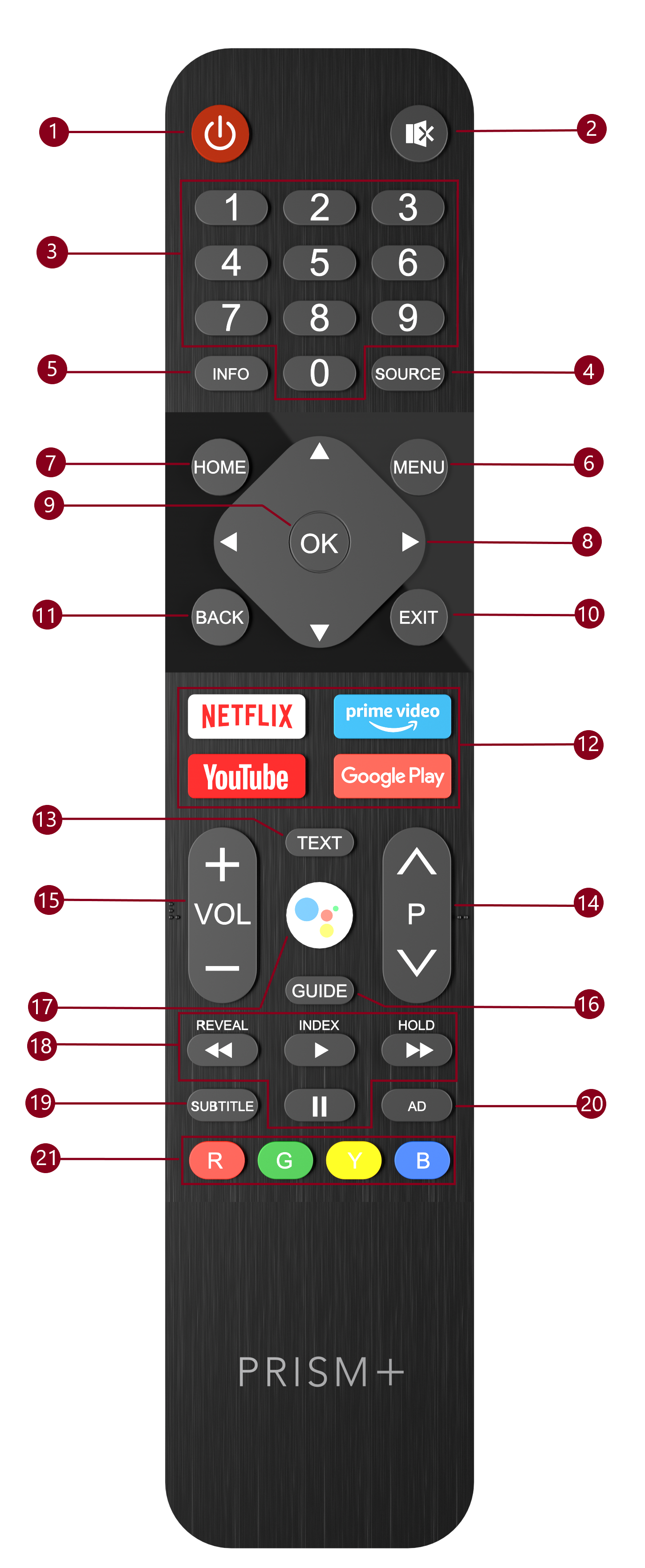
🎮 Remote Control Guide
Basic Functions
- Power: Turn the TV on or to standby/off mode.
- Mute: Mute or restore the TV sound.
- Number Buttons (0~9): Select the channel directly or input a number.
- SOURCE: Select the input source.
- INFO: Access the INFO interface.
- MENU: Access the menu of quick settings.
- HOME: Access the home page.
- Navigating Buttons: Navigate the menu to select the content you need.
- OK: Confirm, enter, or execute the selected item; show the list of Quick Button options.
- EXIT: Exit the current operation.
- BACK: Return to upper-level content or exit the current screen.
- Application Buttons: Access specific applications directly.
Teletext Functions
- TEXT: Access or exit the teletext menu.
Reveal: Display teletext content.
Channel & Volume Control
- Program Up/Down (P^/⌄): Switch channels.
- Volume Up/Down (VOL +/-): Adjust the sound volume.
Additional Features
- GUIDE: Access the EPG interface in DTV mode.
- MIC: Start talking to Google Assistant on the TV.
USB Playback Controls
- Play (▶): Start the playback.
Pause (⏸): Pause the playback.
Fast Backward (⏪): Fast backward the playback.
Fast Forward (⏩): Fast forward the playback.
Special Functions
- SUBTITLE: Turn on or off the subtitle function.
- AD: Turn on or off the function of audio description.
- Color Buttons (R/G/Y/B): Execute the prompt function in specific modes.